Intro
Product Overview
Research & Findings
Problem Statements
Key Decisions
Design Solutions
Go to Market
The Outcomes
Learning

Businesses could refill balance and add employees — but couldn't configure benefits or track expenses.

Every benefit, every change, every report went through an Account Manager.

I designed the external-facing admin interface — 95% of businesses now manage independently.

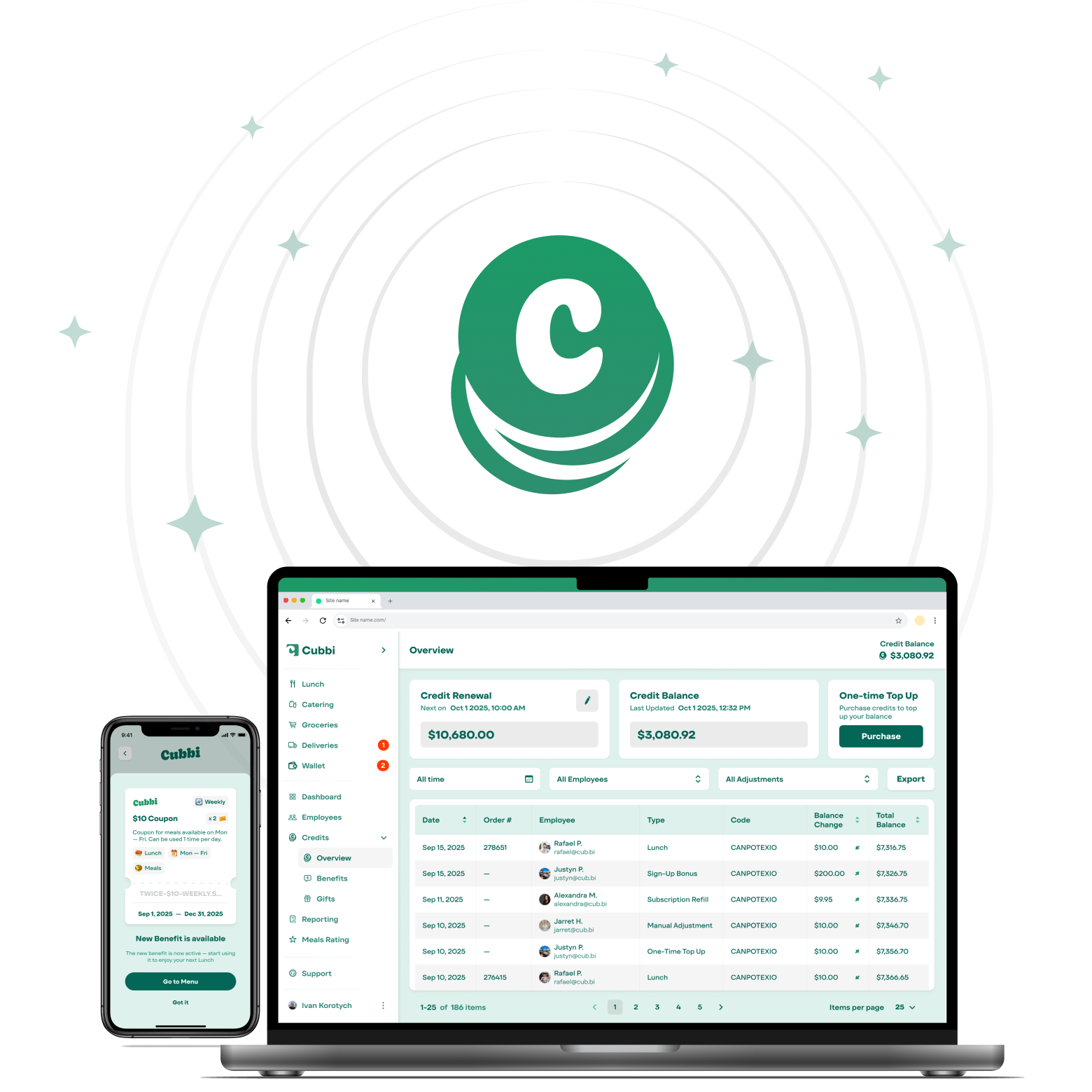
Cubbi Credit Dashboard

Product
Overview

Product Designer End-to-end, 0→1 Design System GTM Visual Design Responsive Web / Mobile 3 months

Cubbi is a B2B2C meal delivery service — freshly prepared cold meals, delivered directly into office fridges across Canadian cities.

Credits are how businesses subsidize employee meals — loaded as a balance, deployed through configurable benefits scoped by service, schedule, and team.

Research &
Findings

User Archetypes
The Champion (Admin) The Team Manager The Employee
Role Office manager, EA, or HR coordinator — the Cubbi admin and primary driver of adoption. Department head or team lead with manager-level permissions, toggled by admin. Individual contributor ordering their own lunch via mobile or web. Self-signs-up via work email.
Goals Configure benefits independently. Keep team ordering consistently. Ensure 100% benefit coverage. Place catering orders without admin dependency. Monitor team usage. Stay out of billing. Order food quickly. Know what's subsidized and what they'll pay. Benefit should just work at checkout.
Challenges Every change required contacting AM. No visibility into spend. Annual renewal required 40-field forms. Had to ask admin for every small action. Permission model was unclear. Catering types weren't self-explanatory. Unclear which discount applied. Expiry felt arbitrary. Delivery notifications were inconsistent.
Skills Medium-high technical comfort. Relies on clear UI language and progressive disclosure. Medium technical comfort. Needs scoped, task-focused dashboard views. High mobile fluency, low patience. Will abandon if benefit logic is unclear at checkout.
Research Method
Interviews with Account Managers and Sales

How benefits are communicated, what configuration errors were most common.

Internal Configuration Log Review

Identified which of the 40 fields were actually used in real benefit setups.

Dependency Mapping with Engineers

Which benefit conditions could be simplified without breaking coverage.

Cross-Team Terminology Audit

Same concept had 4–6 different names across Finance, Sales, Support, AM, Product, Engineering, and Operations — the whole company lacked a common vocabulary.

Usability Testing

Benefit creation flow — progressive disclosure, configuration clarity, error prevention.

Key Findings
FindingSourceImpact
"I'd like to assign credits to my staff without having to contact Cubbi or my account manager"AM interviewsDefined the entire project direction
Businesses needed active vs. inactive benefits, with archive for reporting and duplicate for annual renewalBusiness user interviewsIntroduced active/inactive/archived statuses and a duplicate action for annual renewal
Businesses wanted utilization reporting — spend, by whom, what went unusedBusiness user interviewsAdded reporting section and dashboard with smart blocks
Terminology for the same concept varied across 7+ internal teams — Finance, Sales, Support, AM, Product, Engineering, and OperationsInternal auditTriggered full terminology alignment project before any UI was designed
"Discount Groups" caused misconfiguration — businesses couldn't see the benefits themselves, let alone how discount groups connected to themObservation + AM feedbackEliminated Discount Groups; integrated all conditions inline
Gifting demand was real — birthday gift cards, culture initiatives — but no business-facing gifting existedInbound requests + AM interviewsAdded gifting feature (Credits → Cubbi Cash)

Cubbi: Credit Dashboard

Scenario A — First-Time Setup
Stage
01Activation
02AM Intake
03Requirements
04Configuration
05Employee Setup
06First Order
User Action
CRE property signs with Cubbi. Office tenants are contacted directly — if interested, transferred to AM.
AM calls admin, runs intro, and collects requirements over the phone — no form, no standard structure.
Admin describes what they need. AM translates into internal language and passes to whoever is available on the product team.
Product team configures benefits manually. Admin waits with no status update, no confirmation, no timeline.
Any change to the employee list — adding, removing, reassigning, offboarding — required contacting Cubbi. Admins could not manage benefit assignments themselves.
Admin waits to see if benefits are actually used — no orders feed, no utilization data, no confirmation that setup landed with employees.
Emotion
Passive, uninvolved
Uncertain, reliant
Confused
Waiting, powerless
Frustrated, blocked
In the dark
Pain Point (Before)
No self-service onboarding. All communication was locked on AM — admin had no portal, no visibility, no direct access.
No standard intake process. Requirements were captured ad-hoc on a call, with no form, no confirmation, and no shared terminology.
Sales used one set of terms, AM used another, the product team used a third. No shared language existed — concepts like "subsidy", "coupon", "discount" meant different things to each team.
Anyone available on the product team configured benefits manually. Process took 2–7 days. Admin received no notification when done — and had no way to verify the setup was correct.
Admins could add employees to the system but couldn't assign them to a benefit. Every assignment required contacting AM again.
Admin had no visibility into whether benefits were live or being used — no utilization data, no orders feed, no confirmation the setup worked. The only signal was employees occasionally asking what the benefit was.
Design Response
Credit Dashboard created as the first external-facing business interface.
Self-service onboarding scoped and kicked off — AM still handled intake at the time, but research made removing the bottleneck a clear next priority, especially to unlock scale.
Unified terminology defined with all internal teams before UI was built; applied consistently throughout.
40 fields → 12 essential inputs via progressive disclosure, one section at a time.
Admins gained full self-service control over the employee list — creating benefits and managing who is assigned to them, end-to-end, without contacting Cubbi.
Self-service reporting and spend visibility built into the dashboard.
Emotional Journey
Scenario B — Recurring Management
Stage
01Credit Top-Up
02Benefit Changes
03New Hire
04Usage Review
05Annual Renewal
User Action
Admin tops up credit balance or sets up recurring top-up.
Admin needs to change benefit dates, limits, or employee scope.
Admin adds a new employee to the system and wants them on a benefit.
Admin tries to understand how credits are being used and whether the budget is right.
Admin needs to reconfigure benefits for the new fiscal year.
Emotion
Routine
Blocked, dependent
Frustrated
In the dark
Anxious
Pain Point (Before)
Top-up and recurring balance existed — but admins had no data to know if the amount was right. Benefit utilization wasn't visible.
No edit path existed. Benefits couldn't be modified — any change required contacting AM, waiting for response, and hoping the product team applied it correctly.
Admin could add the employee to the system but couldn't assign them to a benefit. That required AM — meaning new hires waited with no access.
Admins could see general credit dynamics and popular meals, but had no visibility into benefit utilization, per-employee usage, or unused credit breakdown.
No benefit history, no saved configurations. AM had to recall or re-collect requirements from scratch each year — errors at this stage blocked employees from ordering.
Design Response
One-time top-up and recurring credit term purchase available directly from the dashboard.
Full CRUD on benefits in the dashboard; changes take effect immediately.
Self-service employee invite and benefit assignment; new hires active same day.
Benefits persist and can be duplicated or edited; no data loss; admin owns the full renewal independently.
On-demand spend reporting with export; accessible directly from the dashboard.
Emotional Journey
Cautious / Uncertain
Overwhelmed / Stressed
Neutral / In process
Relieved / Confident

Problem
Statements

No self-service

Every benefit, change, and report went through an Account Manager. Businesses had no way to act independently — not a UX gap, a missing product layer.

﹅﹅

...to be able to assign credits to my staff without having to contact Cubbi or my account manager...

﹅﹅

...to have an easy way to spend credits that are slowly banking up from the lack of utilization...

Terminology chaos

Six teams used different words for the same concepts. You can't design a clear interface on top of an inconsistent mental model — language had to be fixed before screens.

﹅﹅

...to see clear distinction between lunch / catering / grocery credits...

﹅﹅

...after the call with our Account Manager I still wasn't sure what kind of discount I can create...

Configuration complexity

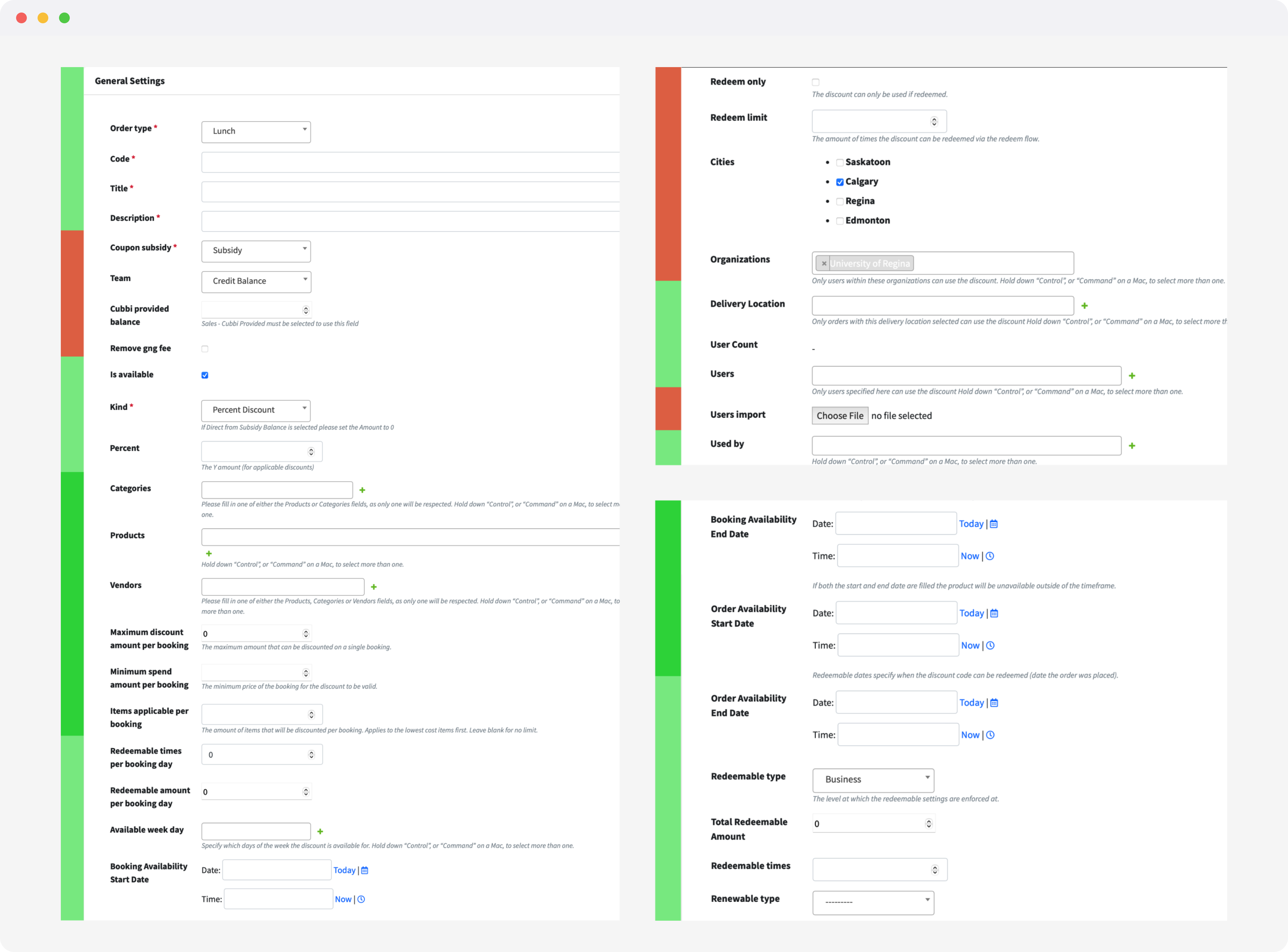
The internal form had 40 fields, no grouping, no logic — built for engineers, exposed to businesses. Even trained AMs made mistakes regularly.

﹅﹅

...we asked for changes and by the time they were made, the setup wasn't what we originally agreed on...

﹅﹅

...any update — even assigning a new employee to an existing benefit — required reaching out to the Cubbi team...

No visibility

No spend tracking, no adoption data, no reporting. Admins managed budgets blind and had to ask AM to pull any numbers.

﹅﹅

...to see how many credits go unused each month to best determine how to increase or decrease my credit allocation...

﹅﹅

...to be warned that my credits are getting low to ensure there is no disruption to my employees...

Key
Decisions

Terminology unification

The most foundational decision in the project. Finance, Sales, Support, and AMs all used different words for the same thing. You can't ship a consistent interface on top of a fractured language layer — alignment had to happen before any screen was drawn.

Before After Description
Coupon subsidy, Cubbi provided balanceCubbi PromoMarketing activation campaigns sponsored by Cubbi
SubsidyCreditsFunds provided by Business to their employees
Cubbi CashCubbi CashEmployee balance — gifted or refunded
Subsidy, DiscountCouponFixed value, single-use during eligible period
Discount, % Discount, Allocation, BalanceBalanceFixed value, flexible spending across multiple purchases during eligible period
Redeem limitBenefit AmountThe maximum amount that can be utilized for the period on this benefit
Maximum discount amount per bookingUse Limit (Coupons only)Limits the number of items — previously applied to balance too but was never used that way
Redeemable typeBy userUsed for limits configuration based on user or business
Total Redeemable AmountRedeemable BudgetTotal redeemable limit for the benefit within the renewable period
Total Redeemable Amount (Coupons)Use Limit per renewable periodCoupon-specific cap on total redemptions within a renewable period
Bookings date, Order dateEligible DaysSimplified from two separate dates to a single concept — days eligible for delivery
UX patterns definition

All configuration opens in slide-out drawers — keeping the admin in context while editing. Close the drawer and you're exactly where you were. No navigation debt for a frequent, recurring task.

Progressive disclosure

12 configuration parameters split across two steps. Step 1: who gets it, how much, when. Step 2: what employees see. The admin defines what the benefit does before naming it. Monthly Redeemable Budget is calculated automatically — not entered manually.

Side drawer for view & edit

Benefit creation and editing opens as a drawer over the Credits overview. The admin keeps full dashboard context while configuring.

Empty state as product education

"No active benefits created yet" doesn't just signal absence — it introduces the product. Three benefit types with descriptions and individual CTAs replace what would otherwise be a dead screen.

Benefit standardization

The same card component appears at every touchpoint — admin benefit list, employee wallet, benefit preview at creation. The data adapts to role: admins see assigned employee count, employees see validity and remaining balance. One mental model across the product.

Overview

Benefits are presented as interactive cards with a summary and quick access to updates, archivation, or activation.

Last step of configuration

At the final step of benefit creation, admins see the exact same benefit preview that employees will see during checkout.

Wallet

The same card in the wallet and checkout areas has extended validity and availability information relevant to spending.

Benefits optimization and migration

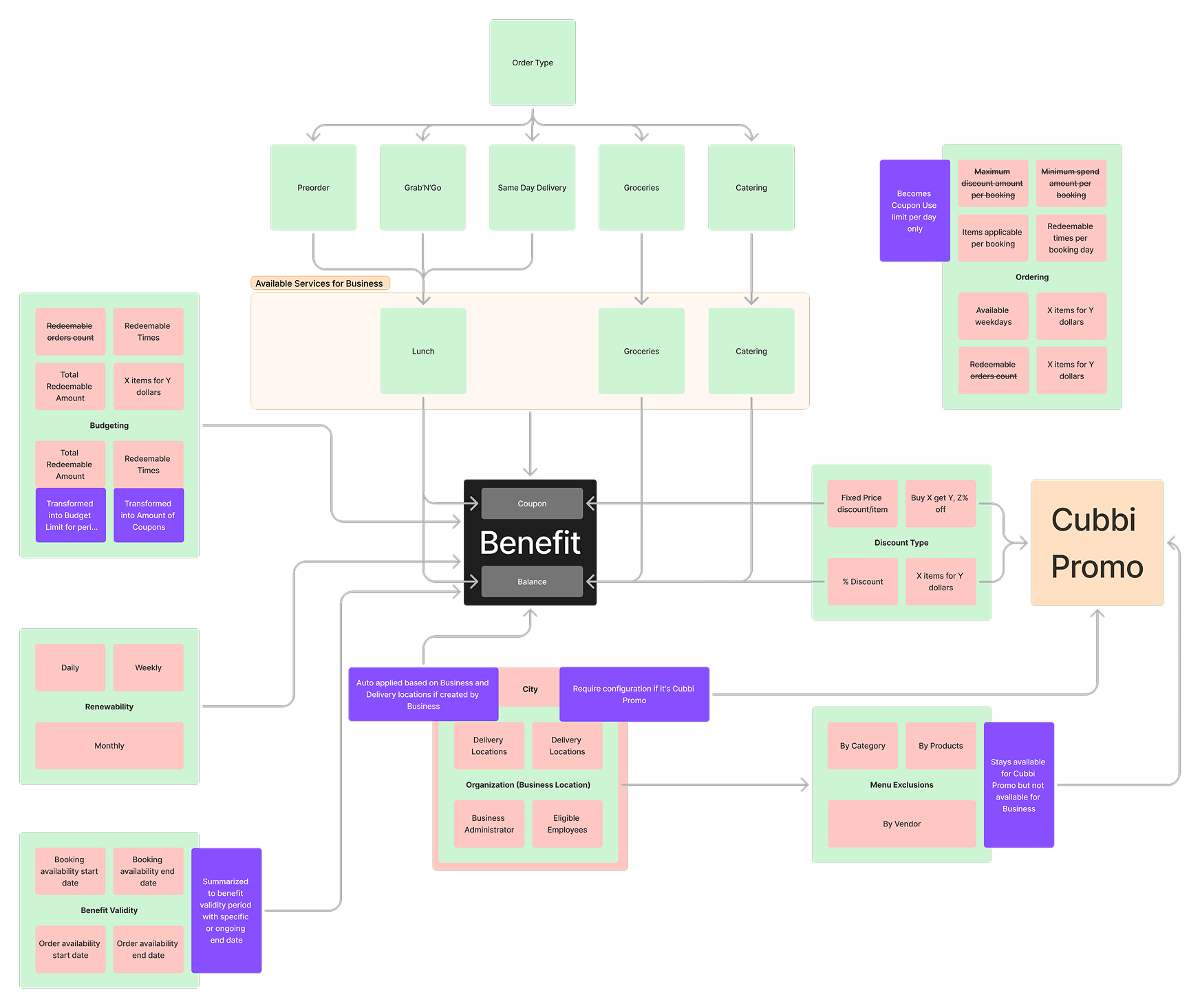
A 40-field form was summarized to 12 fields strictly necessary for making creation accessible for businesses. 100% of existing benefits migrated seamlessly — including ~25 benefits with complex budget conditions.

Original 40-field internal form Benefit type dependency map

Design
Solutions

Benefit configuration

A 40-field internal form reduced to 12 inputs across two progressive steps. Step 1: who gets it, how much, how often, on which days. Step 2: what employees see — title, description, promo code. At the last step, admins preview the exact card that will appear in the employee wallet before activation.

Benefit creation — Step 1 Benefit creation — Step 2 with preview
Responsive across surfaces

The admin interface ships at desktop and the 960px breakpoint. Benefit creation, employee management, and spend reporting work at every viewport. Employee-side interactions — wallet, checkout, notifications — happen primarily on mobile.

Navigation at 960px breakpoint
Benefit card system

One component across every surface. Admin sees assigned employee count and benefit status; employee sees validity, available balance, and spending history. The visual model is identical — an admin who is also an employee recognizes their own benefit instantly. Empty states introduce each benefit type with a description and direct CTA — no blank screen on first login.

Benefit card — Coupon type Benefit card — Balance type
Empty state — Lunch Empty state — Groceries Empty state — Catering
Gifting feature

The same card at three moments: overview for management, final creation step as preview, wallet with validity and remaining balance. What the admin configures is exactly what the employee sees.

Send Gift — step 1: select employees and amount Send Gift — step 2: confirm and notify Employee wallet — gift received notification
Design system — built from scratch

No shared system existed when the project started. I built one to ensure consistency across web and mobile — 35+ components designed and implemented into code, with tokens, variants, and full variable coverage in Figma. Navigation patterns, interaction models, and component libraries prevent engineering debt as the product scales.

Design system components
Credits overview dashboard

Businesses see their complete credits picture in one screen — balance, active benefits, employee coverage, and spending history. Benefits can be created, edited, and activated without leaving the overview.

Credits overview dashboard

Go to
Market

Employee activation

Benefits don't exist until employees know about them. A push notification fires before a benefit goes live — giving employees time to plan orders ahead of their delivery window, not discover a benefit mid-checkout. The Cubbi Wallet surfaces all active benefits with current-period availability, balance remaining, and spending history in one place.

New credit push notification Cubbi Wallet
Credit Overview — onboarding walkthrough
Benefits page — create benefit drawer
Lunch Templates — benefit type selection

The
Outcomes

100% benefit coverage

With the Credit Dashboard launch, businesses saw their existing benefits for the first time — and most recreate them annually to adjust compensation. We reached full coverage of all benefit types, up from the original 95% goal. Template adoption grew from 38% to 73% between November and March, showing businesses weren't just creating benefits — they were doing it faster and more consistently.

95% self-service activation

Businesses create benefits and manage employees without AM involvement — up from near 0% when every change required a support call. One release made self-service the default across the entire business base.

Hours saved for Account Managers

Businesses configure benefits in ~15 minutes on their own — including reading, understanding, and setting up for the first time. What previously took an AM days of back-and-forth, with a real risk of misconfiguration along the way, now happens without them.

Gifting revenue unlocked

Credits that previously sat unused now circulate through the product — gifting gave businesses a reason to spend their balance. The lunch benefit — the primary flow we redesigned — reached a 52% creation conversion rate post-launch. 100 gifts sent in the first 3 weeks after release.

5 min to activate via template

The median time to complete a benefit using a template dropped to ~5 minutes — compared to ~7 min from scratch. Template adoption grew from 38% to 73% over the same period, confirming businesses weren't just finding the shortcut — they were choosing it repeatedly.

Full platform reach in 5 months

97 organizations engaged with the benefits section within the first 5 months of launch. Benefits navigation spiked +120% in January over December, confirming that annual compensation planning is a real behavior — businesses return to create, recreate, and adjust benefits at the start of each year.

The
Learnings

Designing self-service
is about trust,
not freedom.

Users move faster when the system makes constraints explicit, guides them through risky moments, and clearly shows consequences before activation.

Terminology
is infrastructure.

Finance, Sales, Support, and AMs all described the same things with different words. You can't ship a consistent interface on top of a fractured language layer — alignment had to happen before any screen was drawn.